
 MONA OS 2.0
 Partner with MONA


 Tự động hoá doanh nghiệp
 Cẩm nang SEO
 Digital Marketing
 Kinh nghiệm thiết kế website
 Hạ Tầng Server
 Giáo dục

 VI
VI
 EN
EN















Message us on
Zalo Official


 ProductsNew

 ProductsProducts
 Mới ra mắtKHA AI 2027App tự edit video, tự đăng mọi mạng xã hội, 2 phút mỗi ngày










 Website designLooks good and wins customers over.
SEO servicesBrings in customers searching for exactly what you sell.
Website designLooks good and wins customers over.
SEO servicesBrings in customers searching for exactly what you sell.
 Tư vấn digital marketingKéo khách từ nhiều kênh, đo bằng số thật.
Corporate video productionVideos introducing your company, factory and team.
Tư vấn digital marketingKéo khách từ nhiều kênh, đo bằng số thật.
Corporate video productionVideos introducing your company, factory and team.
 NewAI video productionCompany story films made with AI.
 Custom software developmentCRM, ERP and HRM built for your business.
 Viết AI Agent theo yêu cầuĐặt riêng một trợ lý AI cho đúng việc của mình.
 Tư vấn chuyển đổi AIĐưa AI vào vận hành của cả công ty.
NewMONA LMSManagement for centers and schools.
MONA SkillHubInternal training for company staff.
Tư vấn chuyển đổi AIĐưa AI vào vận hành của cả công ty.
NewMONA LMSManagement for centers and schools.
MONA SkillHubInternal training for company staff.
 NHTQ systemEnd-to-end China–Vietnam shipping operations.
MONA JMSManagement for gold, diamond and pawn shops.
NHTQ systemEnd-to-end China–Vietnam shipping operations.
MONA JMSManagement for gold, diamond and pawn shops.
 MONA E-LearningA website with every feature you need to sell courses.
 How to sell online courses (course)More than 30 free lessons on selling courses on autopilot.
 MONA Cloudmonacloud.vnServers to get your apps and websites running.
 MONA Basemonabase.vnPostgres database, sign-in and file storage.
 MONA Mailmonamail.vnSend OTP, order and invoice emails from your software.
 MONA Paymonapay.vnAccept bank transfers via VietQR and notify your software when the money arrives.
 MONA eInvoiceComing soonIssue e-invoices that meet tax standards.
Gấu CườiTrả lời khách 24/7 trên web, Fanpage, Zalo và thu lead cho sale.
MONA eInvoiceComing soonIssue e-invoices that meet tax standards.
Gấu CườiTrả lời khách 24/7 trên web, Fanpage, Zalo và thu lead cho sale.
 Gấu TeleSalesGọi điện tư vấn, chăm khách như tổng đài viên thật.
Dê CườiTư vấn và chốt đơn cho shop ngay trong khung chat.
Gấu WebmasterNhắn nhóm Zalo là website được sửa xong.
Gấu TeleSalesGọi điện tư vấn, chăm khách như tổng đài viên thật.
Dê CườiTư vấn và chốt đơn cho shop ngay trong khung chat.
Gấu WebmasterNhắn nhóm Zalo là website được sửa xong.
 Gấu Pháp ChếSoạn hợp đồng, rà điều khoản trong vài phút.
 Gấu Báo GiáLên báo giá đúng mẫu và gửi khách ngay.
 AI chăm sóc khách hàngTheo dõi và giữ chân khách hàng cũ.
 Gấu Tuyển DụngLọc hồ sơ, hẹn lịch, phỏng vấn ứng viên.
 Mới ra mắt
KHA AI 2027
Xây kênh chuyên gia 2 phút mỗi ngày
Quay bằng điện thoại, AI tự edit video, tự đăng lên 16 nền tảng và tự trả lời bình luận, tin nhắn.
421.680lượt xem trên kênh CEO MONA sau 23 ngày
Mới ra mắt
KHA AI 2027
Xây kênh chuyên gia 2 phút mỗi ngày
Quay bằng điện thoại, AI tự edit video, tự đăng lên 16 nền tảng và tự trả lời bình luận, tin nhắn.
421.680lượt xem trên kênh CEO MONA sau 23 ngày
 Anh Khánh HùngCEO MONA đang dùng mỗi ngày
Xem app làm được gì
Anh Khánh HùngCEO MONA đang dùng mỗi ngày
Xem app làm được gì
 AI
Gấu Cười MONA ĐANG TỰ XÀITrả lời khách 24/7 trên website, Zalo OA, Messenger và thu lead về cho sale.
Dê CườiChốt đơn bán lẻ và sàn: Shopee, TikTok Shop, web. Chăm cả khách sỉ, đại lý.
Gấu WebmasterCập nhật nội dung, tối ưu SEO website mỗi ngày.
Gấu TeleSalesGọi điện tư vấn, chăm khách như tổng đài viên thật.
Gấu Tuyển DụngLọc hồ sơ, hẹn lịch, phỏng vấn ứng viên tự động.
AI chăm sóc khách hàngGiữ khách cũ, cứu lead đã rớt cho phòng kinh doanh.
Gấu Pháp ChếSoạn hợp đồng, rà điều khoản trong vài phút.
Gấu Báo GiáLên báo giá đúng mẫu, gửi khách ngay khi có yêu cầu.
AI
Gấu Cười MONA ĐANG TỰ XÀITrả lời khách 24/7 trên website, Zalo OA, Messenger và thu lead về cho sale.
Dê CườiChốt đơn bán lẻ và sàn: Shopee, TikTok Shop, web. Chăm cả khách sỉ, đại lý.
Gấu WebmasterCập nhật nội dung, tối ưu SEO website mỗi ngày.
Gấu TeleSalesGọi điện tư vấn, chăm khách như tổng đài viên thật.
Gấu Tuyển DụngLọc hồ sơ, hẹn lịch, phỏng vấn ứng viên tự động.
AI chăm sóc khách hàngGiữ khách cũ, cứu lead đã rớt cho phòng kinh doanh.
Gấu Pháp ChếSoạn hợp đồng, rà điều khoản trong vài phút.
Gấu Báo GiáLên báo giá đúng mẫu, gửi khách ngay khi có yêu cầu.
 Chuyển đổi AI toàn phầnGiải pháp tổng cho doanh nghiệp, 3 lớp triển khai.
 Viết AI Agent theo yêu cầuĐặt riêng một con AI gánh đúng nghiệp vụ của bạn.
 Custom softwareCRM, ERP and HRM with built-in AI automation.
 SEO & AEO thời đại AIĐược Google lẫn AI trích dẫn, không chỉ xếp hạng.
 Kiến thức AI cho doanh nghiệpBài phân tích, hướng dẫn ứng dụng AI vào vận hành.
 Free AI courses
 AI tools at work
App mới · KHA AI 2027
Xây kênh 2 phút mỗi ngày
AI tự edit video, tự đăng mọi mạng xã hội
Free consultation, 8am–10pm every day
AI tools at work
App mới · KHA AI 2027
Xây kênh 2 phút mỗi ngày
AI tự edit video, tự đăng mọi mạng xã hội
Free consultation, 8am–10pm every day

18 March, 2023

Anyone working in technology today has likely heard of “Cloudflare,” especially specialists in webmaster. The most important thing Cloudflare offers is faster website access for your visitors. Even so, many people are still unfamiliar with it. So what is Cloudflare? Read on to find out.
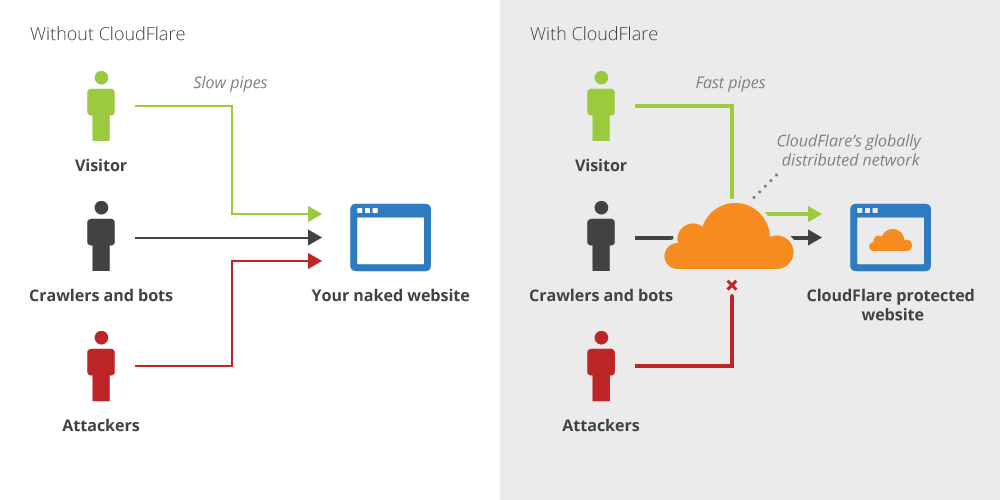
Cloudflare is an intermediary DNS service whose protective layer manages traffic between your server and clients. Put simply, you use Cloudflare’s name servers instead of reaching your website directly through your own DNS (Domain Name Server). All traffic passes through Cloudflare’s servers before it can reach your website data.

With powerful features that ordinary DNS providers don’t offer, Cloudflare is a favorite among webmasters. Beyond the basic functions, Cloudflare also offers CDN, SPDY, spam protection, a firewall against DDOS, Forward Domain, SSL certificates,…
Cloudflare is currently completely free, which makes it popular for many different purposes, especially its features for speeding up and securing your website.

You can use it like an ordinary DNS service by turning off the domain’s cloud (proxy) setting. Some reasons you should use Cloudflare include:

A basic Cloudflare setup is fairly simple and takes 4 steps:
Go to Cloudflare’s home page at https://www.cloudflare.com/ and sign up for an account.
After signing up, log in to Cloudflare with the email and password you just registered.
Enter the website you want to use Cloudflare’s free DNS service for, click “Add site,” and wait about 60 seconds.
Next, choose a plan. Here, choose the free plan.
Then wait for Cloudflare to scan the DNS records already on domains your domain. If you have already created DNS records, Cloudflare shows them below. If not, you need to create new DNS records to point your domain.
The configuration differs depending on your domain provider, but the basic idea is to replace the old nameservers at your provider with Cloudflare’s new ones.
When this step is done, wait for Cloudflare to confirm that your nameservers now point to it. This usually takes about 1 to 2 hours, not the full 24 hours the notice says.
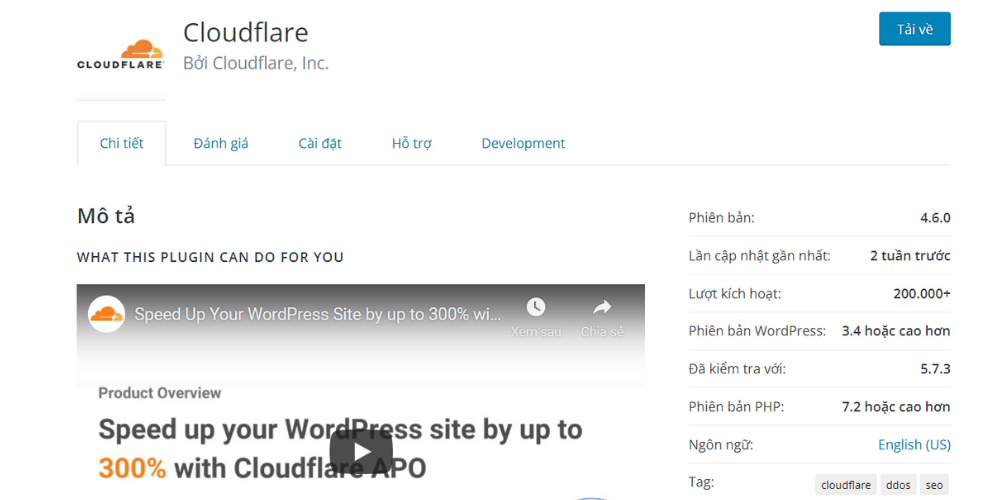
Install the Cloudflare plugin before setting up SSL, to make managing your website easier. It will also help with SSL configuration later. Follow the steps below to install it:
Before you enable SSL, install the Cloudflare plugin to make managing your website easier. It also helps with SSL configuration later. To install it, follow these steps:
If you want your website to use HTTPS, you need to enable SSL on this intermediary DNS service
There are 3 types of SSL certificates for users, matching different levels of use and security. All three encrypt visitor traffic, which adds value to your website and gets better ratings from Google. The Cloudflare SSL certificate types are:

Our advice: if you aren’t comfortable with servers, use Flexible SSL to keep things simple and easy.
To enable it, go to Crypto and, under SSL, click to enable Flexible. Then allow up to 24 hours for Cloudflare to install and activate Flexible SSL.
If the Status shows Active Certificate, it worked. You can now reach your site over HTTPS by typing the address directly. Because it won’t switch from HTTP to HTTPS automatically, remember to turn on automatic redirection

Scroll down a little, below Crypto, to find Always Use HTTPS and set it to On. After this step, all HTTP requests to your website are redirected to HTTPS automatically.
You also need one more step to fix cases where some CSS, JS or images still load over HTTP. Scroll down to Automatic HTTPS Rewrites and turn it On, and you’re done.
In some cases, though, you will also need the SSL Insecure Content Fixer plugin to fix the errors above.
After reading this article, you should have a clear idea of what Cloudflare is. Depending on your situation, you can use it to speed up your website for visitors. All traffic to your website will also be switched to HTTPS automatically.

CEO & Founder · The MONA
Founder of The MONA, who built a services company of 200+ staff with 14,000+ projects delivered. Khánh Hùng shares how he thinks about building systems that run themselves, automating a business, and the real lessons from delivering projects at MONA.
 1,6K
1,6K




Professional website
design services
Own a website with a beautiful, 100% exclusive design and a lifetime warranty, with the ability
to expand features flexibly as your business grows, starting today!








 MONA will never sell your information or send you spam
MONA will never sell your information or send you spam
MONA will never sell your information or send you spam


 MONA will never sell your information or send you spam