
 MONA OS 2.0
 Partner with MONA


 Tự động hoá doanh nghiệp
 Cẩm nang SEO
 Digital Marketing
 Kinh nghiệm thiết kế website
 Hạ Tầng Server
 Giáo dục

 VI
VI
 EN
EN











Message us on
Zalo Official


 ProductsNew

 ProductsProducts
 Mới ra mắtKHA AI 2027App tự edit video, tự đăng mọi mạng xã hội, 2 phút mỗi ngày










 Website designLooks good and wins customers over.
SEO servicesBrings in customers searching for exactly what you sell.
Website designLooks good and wins customers over.
SEO servicesBrings in customers searching for exactly what you sell.
 Tư vấn digital marketingKéo khách từ nhiều kênh, đo bằng số thật.
Corporate video productionVideos introducing your company, factory and team.
Tư vấn digital marketingKéo khách từ nhiều kênh, đo bằng số thật.
Corporate video productionVideos introducing your company, factory and team.
 NewAI video productionCompany story films made with AI.
 Custom software developmentCRM, ERP and HRM built for your business.
 Viết AI Agent theo yêu cầuĐặt riêng một trợ lý AI cho đúng việc của mình.
 Tư vấn chuyển đổi AIĐưa AI vào vận hành của cả công ty.
NewMONA LMSManagement for centers and schools.
MONA SkillHubInternal training for company staff.
Tư vấn chuyển đổi AIĐưa AI vào vận hành của cả công ty.
NewMONA LMSManagement for centers and schools.
MONA SkillHubInternal training for company staff.
 NHTQ systemEnd-to-end China–Vietnam shipping operations.
MONA JMSManagement for gold, diamond and pawn shops.
NHTQ systemEnd-to-end China–Vietnam shipping operations.
MONA JMSManagement for gold, diamond and pawn shops.
 MONA E-LearningA website with every feature you need to sell courses.
 How to sell online courses (course)More than 30 free lessons on selling courses on autopilot.
 MONA Cloudmonacloud.vnServers to get your apps and websites running.
 MONA Basemonabase.vnPostgres database, sign-in and file storage.
 MONA Mailmonamail.vnSend OTP, order and invoice emails from your software.
 MONA Paymonapay.vnAccept bank transfers via VietQR and notify your software when the money arrives.
 MONA eInvoiceComing soonIssue e-invoices that meet tax standards.
Gấu CườiTrả lời khách 24/7 trên web, Fanpage, Zalo và thu lead cho sale.
MONA eInvoiceComing soonIssue e-invoices that meet tax standards.
Gấu CườiTrả lời khách 24/7 trên web, Fanpage, Zalo và thu lead cho sale.
 Gấu TeleSalesGọi điện tư vấn, chăm khách như tổng đài viên thật.
Dê CườiTư vấn và chốt đơn cho shop ngay trong khung chat.
Gấu WebmasterNhắn nhóm Zalo là website được sửa xong.
Gấu TeleSalesGọi điện tư vấn, chăm khách như tổng đài viên thật.
Dê CườiTư vấn và chốt đơn cho shop ngay trong khung chat.
Gấu WebmasterNhắn nhóm Zalo là website được sửa xong.
 Gấu Pháp ChếSoạn hợp đồng, rà điều khoản trong vài phút.
 Gấu Báo GiáLên báo giá đúng mẫu và gửi khách ngay.
 AI chăm sóc khách hàngTheo dõi và giữ chân khách hàng cũ.
 Gấu Tuyển DụngLọc hồ sơ, hẹn lịch, phỏng vấn ứng viên.
 Mới ra mắt
KHA AI 2027
Xây kênh chuyên gia 2 phút mỗi ngày
Quay bằng điện thoại, AI tự edit video, tự đăng lên 16 nền tảng và tự trả lời bình luận, tin nhắn.
431.279lượt xem trên kênh CEO MONA sau 23 ngày
Mới ra mắt
KHA AI 2027
Xây kênh chuyên gia 2 phút mỗi ngày
Quay bằng điện thoại, AI tự edit video, tự đăng lên 16 nền tảng và tự trả lời bình luận, tin nhắn.
431.279lượt xem trên kênh CEO MONA sau 23 ngày
 Anh Khánh HùngCEO MONA đang dùng mỗi ngày
Xem app làm được gì
Anh Khánh HùngCEO MONA đang dùng mỗi ngày
Xem app làm được gì
 AI
Gấu Cười MONA ĐANG TỰ XÀITrả lời khách 24/7 trên website, Zalo OA, Messenger và thu lead về cho sale.
Dê CườiChốt đơn bán lẻ và sàn: Shopee, TikTok Shop, web. Chăm cả khách sỉ, đại lý.
Gấu WebmasterCập nhật nội dung, tối ưu SEO website mỗi ngày.
Gấu TeleSalesGọi điện tư vấn, chăm khách như tổng đài viên thật.
Gấu Tuyển DụngLọc hồ sơ, hẹn lịch, phỏng vấn ứng viên tự động.
AI chăm sóc khách hàngGiữ khách cũ, cứu lead đã rớt cho phòng kinh doanh.
Gấu Pháp ChếSoạn hợp đồng, rà điều khoản trong vài phút.
Gấu Báo GiáLên báo giá đúng mẫu, gửi khách ngay khi có yêu cầu.
AI
Gấu Cười MONA ĐANG TỰ XÀITrả lời khách 24/7 trên website, Zalo OA, Messenger và thu lead về cho sale.
Dê CườiChốt đơn bán lẻ và sàn: Shopee, TikTok Shop, web. Chăm cả khách sỉ, đại lý.
Gấu WebmasterCập nhật nội dung, tối ưu SEO website mỗi ngày.
Gấu TeleSalesGọi điện tư vấn, chăm khách như tổng đài viên thật.
Gấu Tuyển DụngLọc hồ sơ, hẹn lịch, phỏng vấn ứng viên tự động.
AI chăm sóc khách hàngGiữ khách cũ, cứu lead đã rớt cho phòng kinh doanh.
Gấu Pháp ChếSoạn hợp đồng, rà điều khoản trong vài phút.
Gấu Báo GiáLên báo giá đúng mẫu, gửi khách ngay khi có yêu cầu.
 Chuyển đổi AI toàn phầnGiải pháp tổng cho doanh nghiệp, 3 lớp triển khai.
 Viết AI Agent theo yêu cầuĐặt riêng một con AI gánh đúng nghiệp vụ của bạn.
 Custom softwareCRM, ERP and HRM with built-in AI automation.
 SEO & AEO thời đại AIĐược Google lẫn AI trích dẫn, không chỉ xếp hạng.
 Kiến thức AI cho doanh nghiệpBài phân tích, hướng dẫn ứng dụng AI vào vận hành.
 Free AI courses
 AI tools at work
App mới · KHA AI 2027
Xây kênh 2 phút mỗi ngày
AI tự edit video, tự đăng mọi mạng xã hội
Free consultation, 8am–10pm every day
AI tools at work
App mới · KHA AI 2027
Xây kênh 2 phút mỗi ngày
AI tự edit video, tự đăng mọi mạng xã hội
Free consultation, 8am–10pm every day

07 June, 2023
Facebook advertising has become an essential marketing tool in the business strategy of most companies today. With more than 2.8 billion users worldwide, Facebook not only gives you a chance to reach potential customers but also lets advertisers tailor campaigns for the best results. So how do you run Facebook ads yourself while keeping costs down and raising your order rate? In this article, MONA Media will guide you step by step from basic to advanced, helping you set up and optimize your Facebook ad campaigns to grow revenue and build your brand sustainably.
Facebook offers many ad formats to match different marketing goals. Here are the most popular ones on the platform:
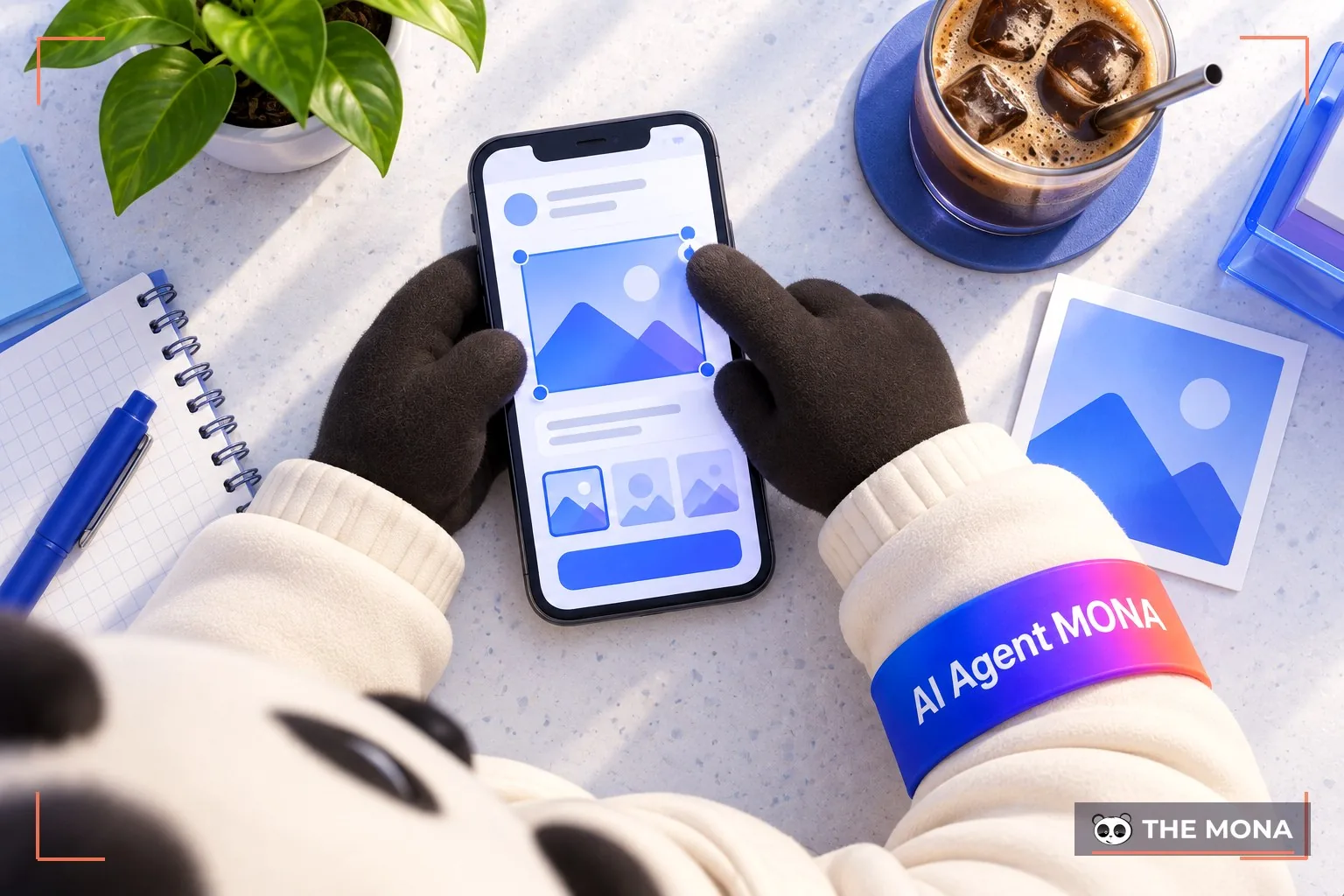
Image ads are one of the most common Facebook ad types you will come across. The ad uses just a single image combined with text, a link and a CTA to catch users' attention. It is one of the simplest and most effective ad formats.
Video ads on Facebook are a popular choice for businesses today, because viewers tend to prefer watching video over reading text. Video ads let you use video to capture attention, tell your brand story or present products and services in detail. This format is highly interactive, which improves marketing performance and raises the chance of conversion.
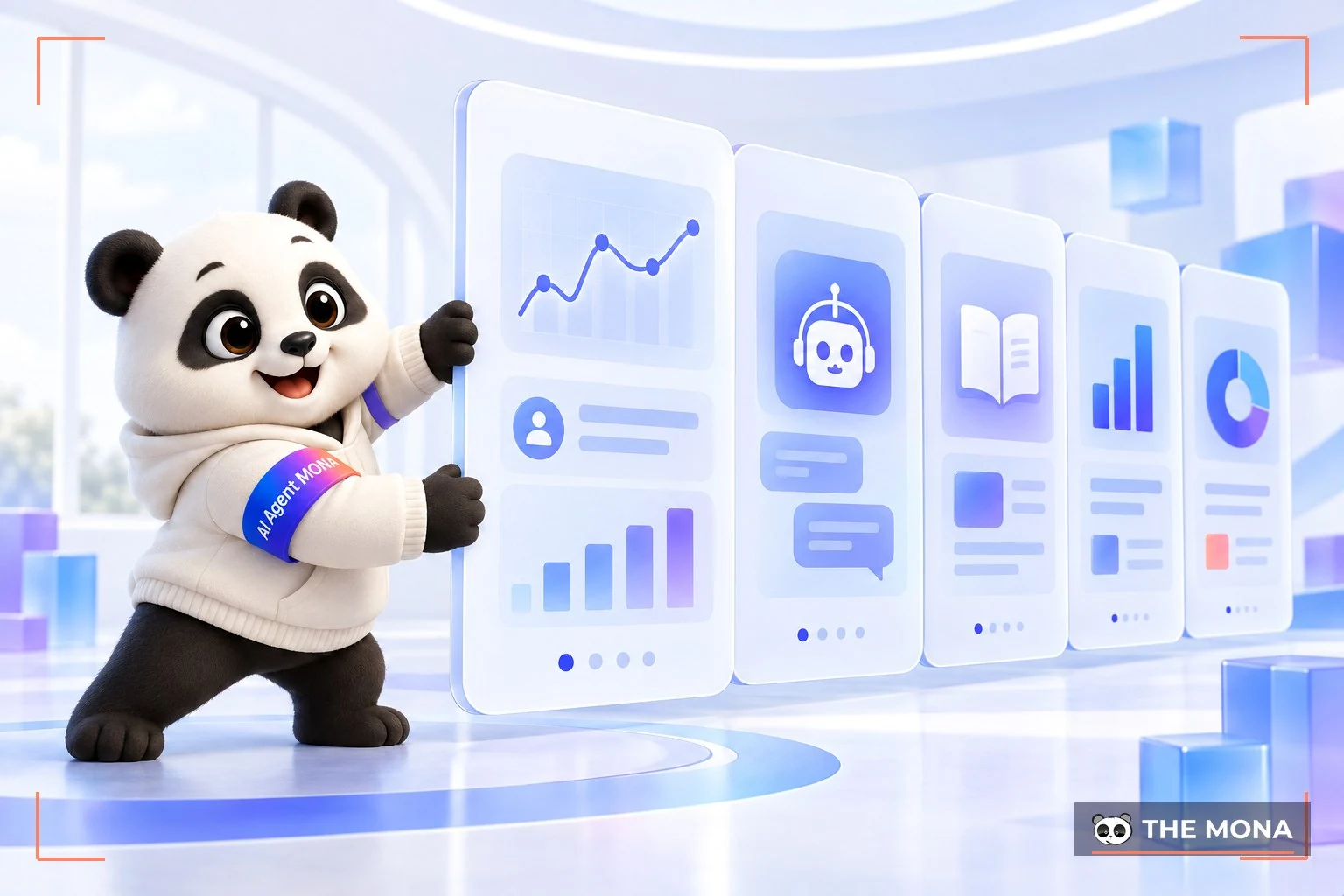
This format shows multiple images or videos in a single ad. It suits campaigns that tell a brand story, introduce products, compare features or highlight what is special about a product or service. Showing several images or videos also increases the time people spend with the ad.
Collection ads make it easy for customers to view and buy your products. The ad shows images of all the products in the collection, and people can tap it to learn more about a specific product. You can also look at the Instant Experience to get an overview of collection ads on Facebook.
Many businesses use Stories ads in video form because they look like the Stories people post every day, which feels more authentic and gives a better experience. Stories also have a CTA button that encourages customers to act.
This ad format helps your software reach more users. Customers can try the software or game for free for a limited time, getting the best experience before they download it.
Messenger ads make it easy for people to start a conversation with your business. Instead of showing one-way ad information, they open a two-way conversation, letting you advise and support customers quickly and raise your conversion rate.
Before running Facebook Ads, start by preparing 3 essential below:
To run ads on Facebook, the first requirement is a Fanpage account (the Fanpage used to run FB Ads). If you see someone running ads from a "personal profile", it is actually a Facebook Fanpage they have named like a personal profile.
When you run FB Ads, you run the posts and images published on this Fanpage. The quality of the Fanpage greatly affects whether a campaign works. So take time to polish and maintain your Fanpage content before running a campaign to get better results.
*Note: If your Fanpage is new, fill in all the information and post regularly, at least 10 posts, to build trust before starting an ad campaign.
The second requirement is to create a Facebook ad account, which comes in 2 types:
*Advice: If you have to pick one of the two, MONA recommends the BM account for the most benefits, because:
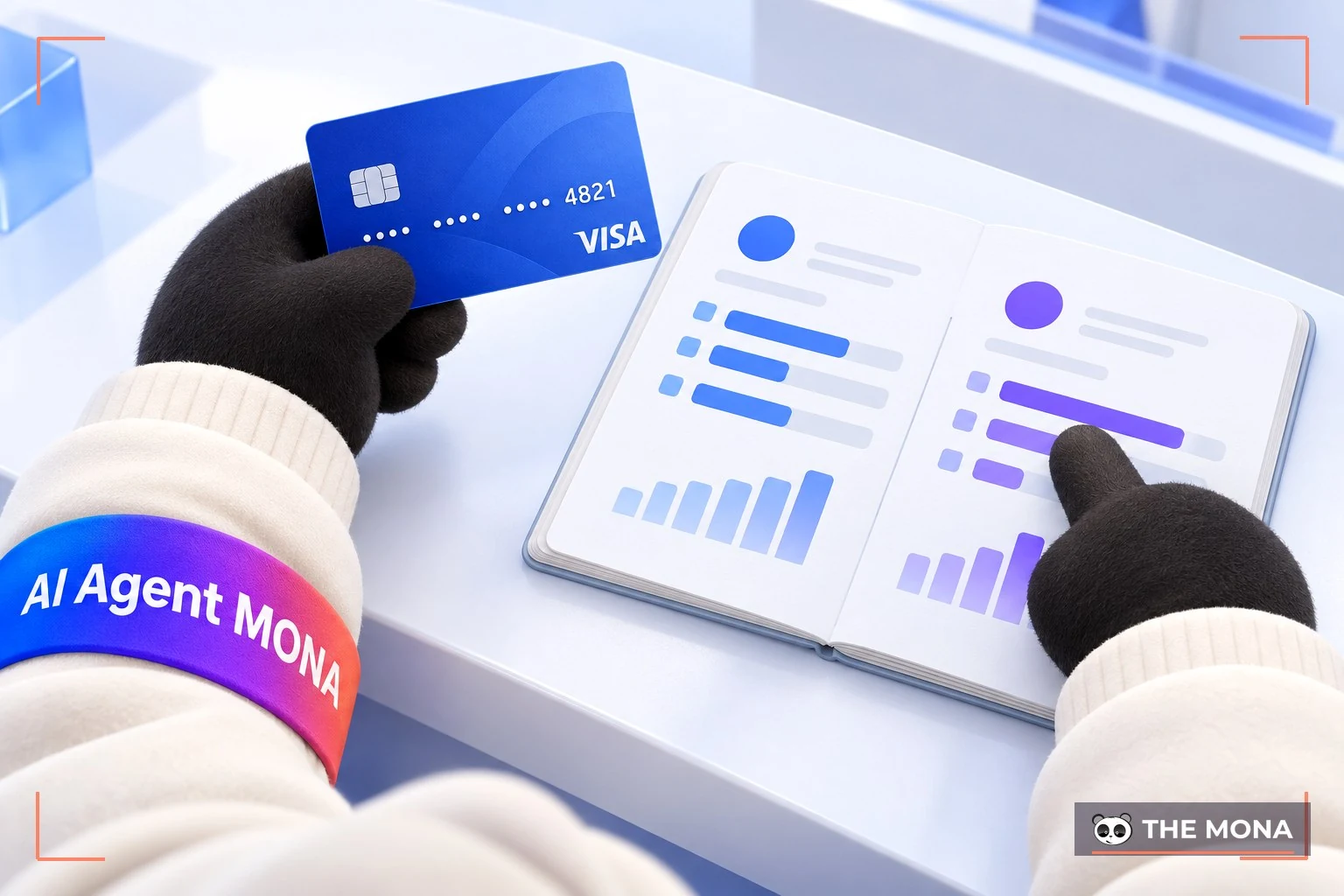
The last thing to prepare so you can run Facebook ads effectively is a Visa card. Facebook now accepts payment with all types of international payment cards. You can choose one of 2 types:
*Advice: If you are new, use a debit card so you can control spending and avoid exceeding your planned ad budget.
If you do not yet have all 3 account types commonly used to run Facebook ads (Business Manager, Fanpage and ad account), you need to set them up first. Here is how:
If you already have a Facebook Business account, you can start here. If not, follow the steps below.
To run FB Ads, you first need a Fanpage. Here is how to create one:
*Note: Think carefully about the Page name before creating it, because Facebook limits how often you can rename an account within a certain period, which can be up to 75 days (depending on the case).
Creating an ad account is also quite simple. Do it as follows:
Read it now: How to create a Facebook account, easy and detailed from A to Z
Once the above is ready, you can run Facebook ads yourself with the detailed steps MONA shares below:
Step 1 – Create ads (Create Ads)
To start an ad campaign, you have 2 options:
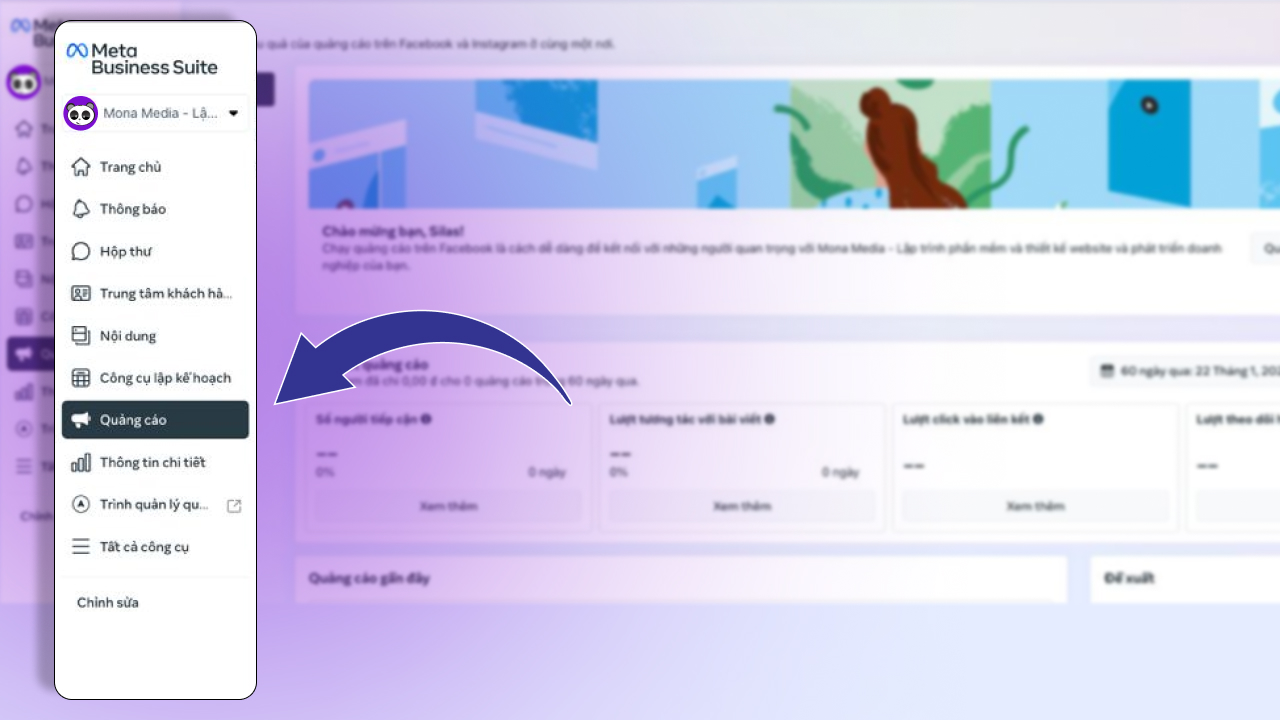
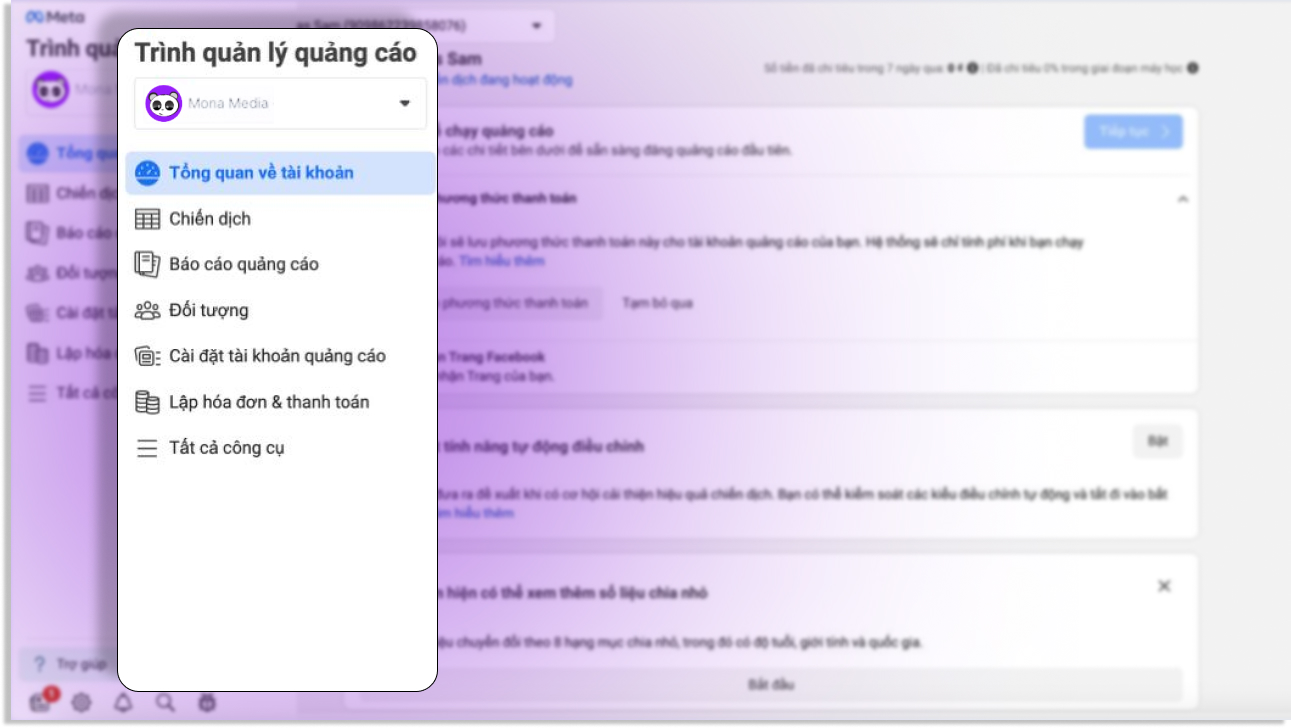
After setting up your payment method, click over to the "Campaigns" page. Click the "To create" button and a popup will appear for you to choose the campaign objective and set up the ad set (set the budget, choose the target audience, schedule, ad placement, content and so on).
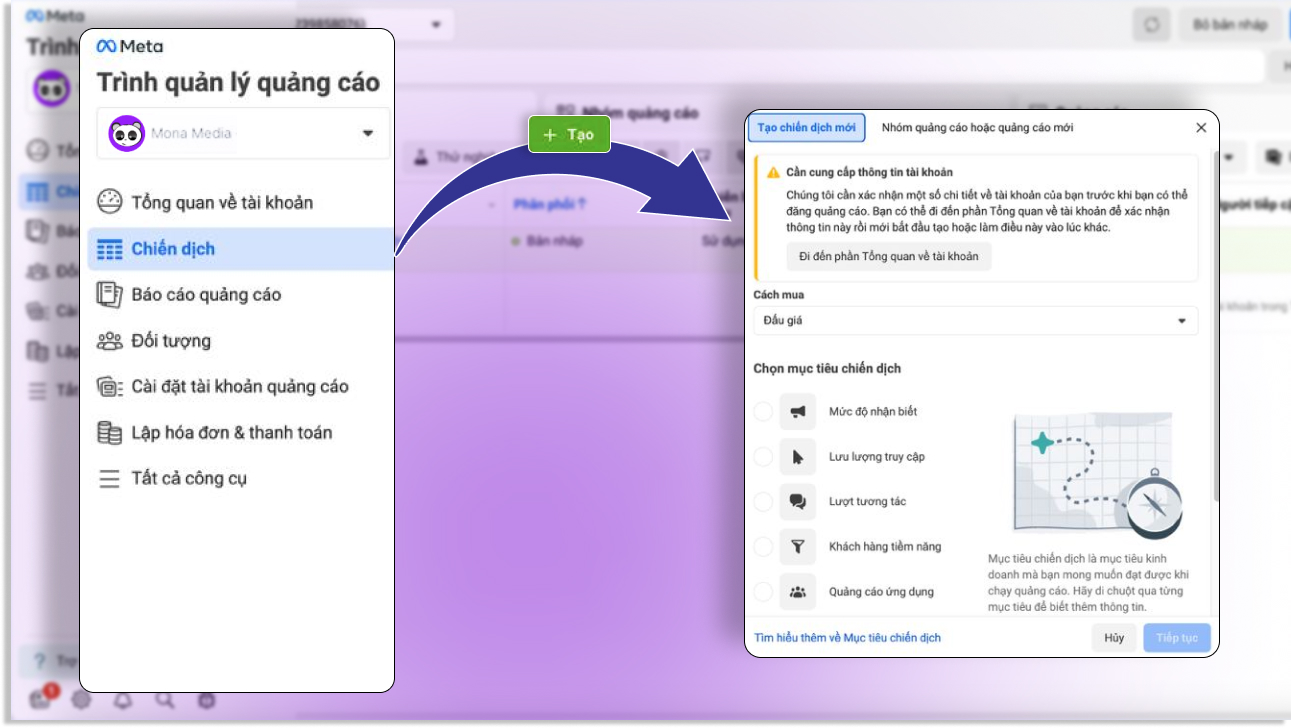
Step 2 – Set the ad campaign objective
Next, define the objective of your campaign. Facebook will then determine the right ad format and bidding options for your campaign objective. Objectives can include:
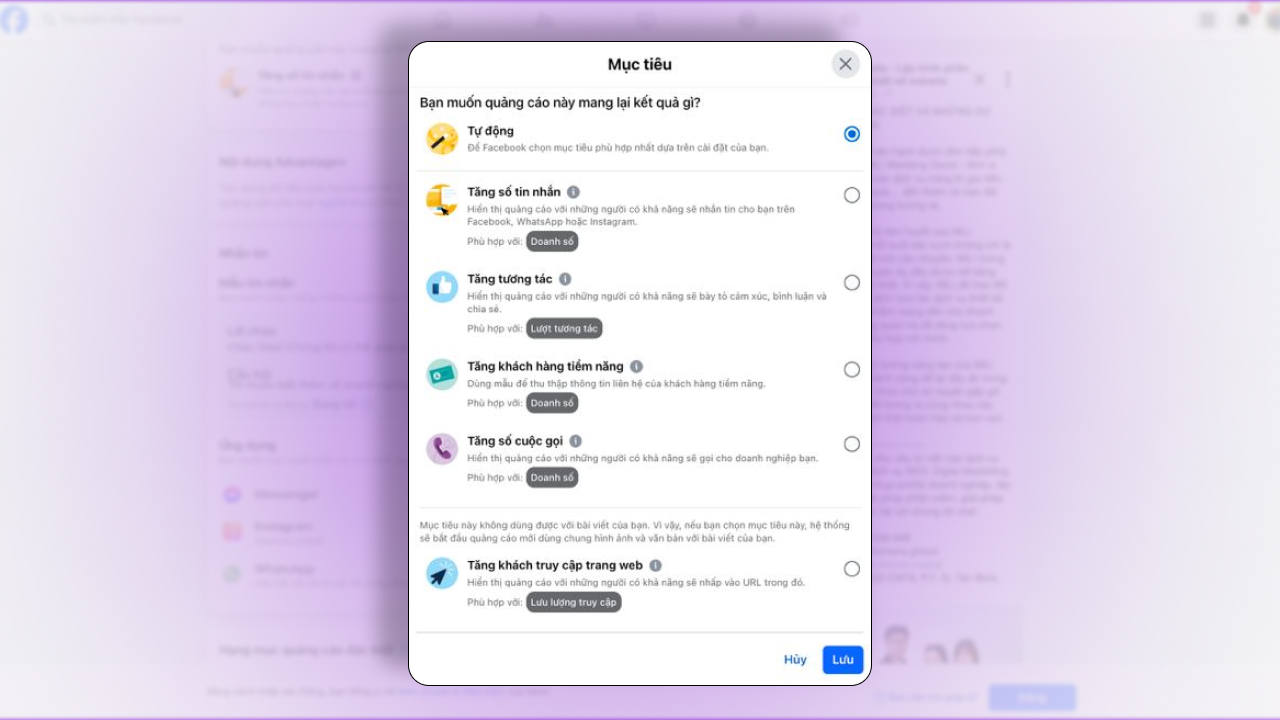
Step 3 – Name your Facebook Ads campaign
Naming your campaign makes it easier to manage and to evaluate ad performance. It also gives you a clear time reference and makes things easier to navigate later.
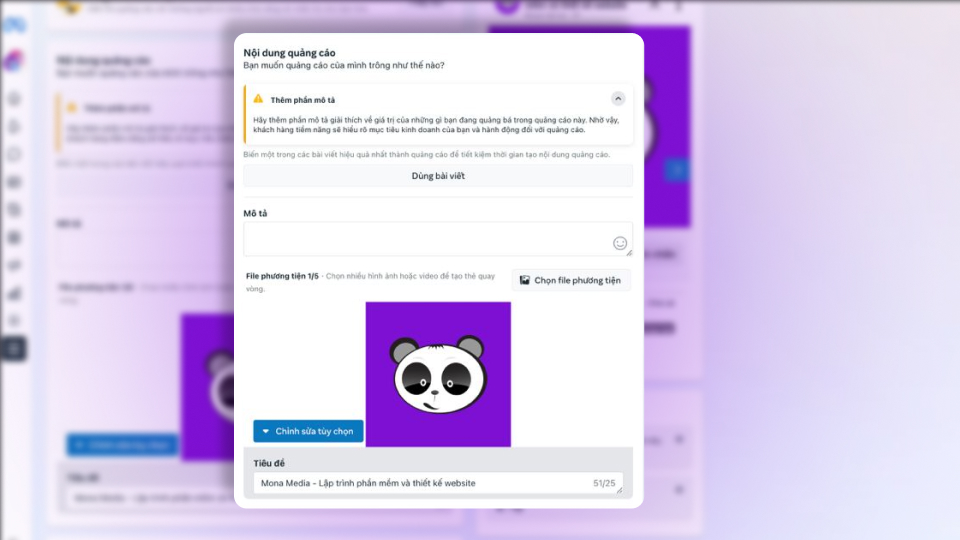
Step 4 – Choose the right ad category
When choosing an ad category, consider these options:
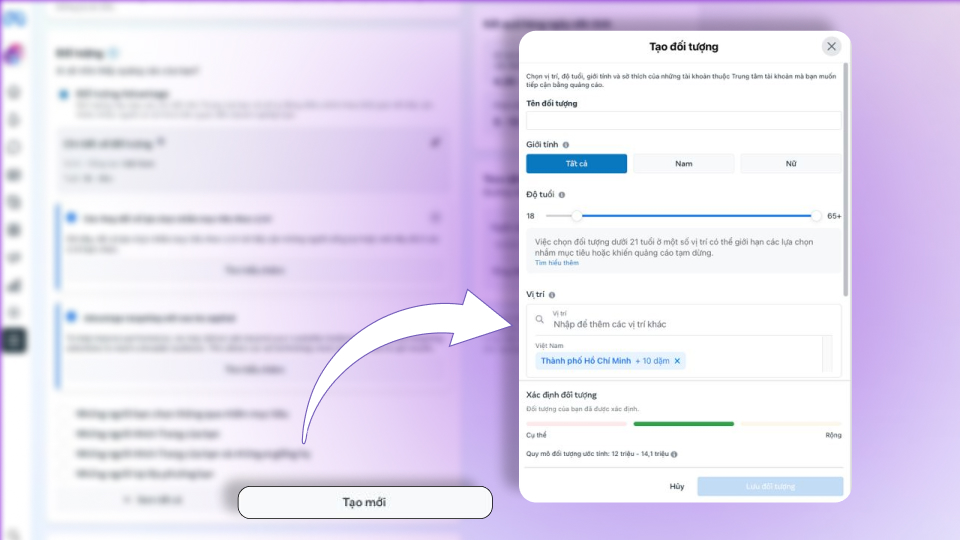
Step 5 – Enter account information and choose your audience
The next step is very important when running Facebook Ads: defining your audience, including name, gender, age, language and so on. Setting the right target audience helps your campaign reach people who are genuinely interested, which raises your conversion rate more effectively.
Step 6 – Set the budget and bid
You can choose from 3 types of budget:
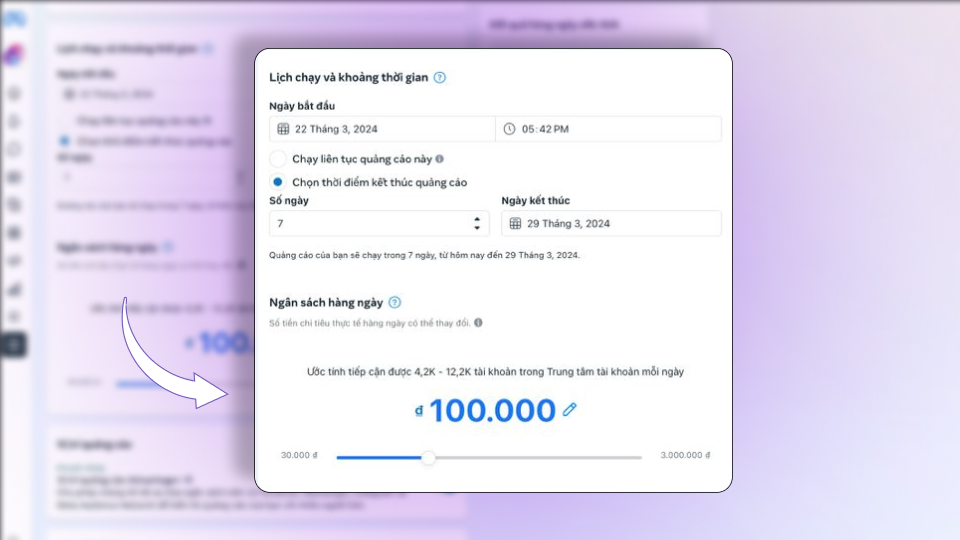
This step can affect the whole campaign, so consider carefully and choose the budget that best fits your strategy.
Explore now: How to set bids for Facebook ads effectively
Step 7 – Choose ad placements
You can flexibly choose different ad placements such as Facebook, Instagram, Audience Network or other placement options.
If you choose Advantage+ placements your ads will be shown in the most optimized way, possibly on Instagram and Audience Network. Each placement serves a different purpose in reaching customers. You can also choose Manual placements if you want to customize them. There are 3 placement options:
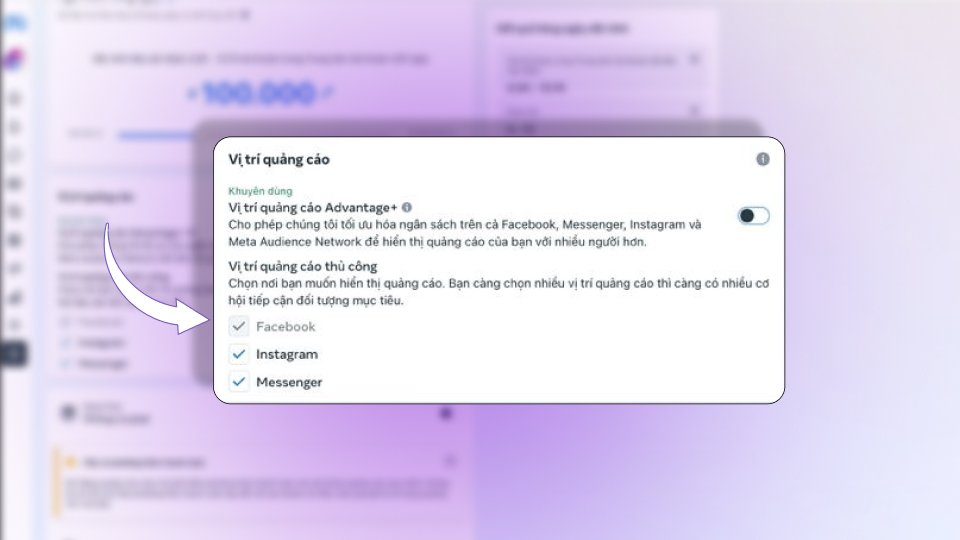
Step 8 – Preview your FB Ads
After completing the steps above, your ad campaign is nearly ready. At this step, just preview the ad to make sure everything looks right.
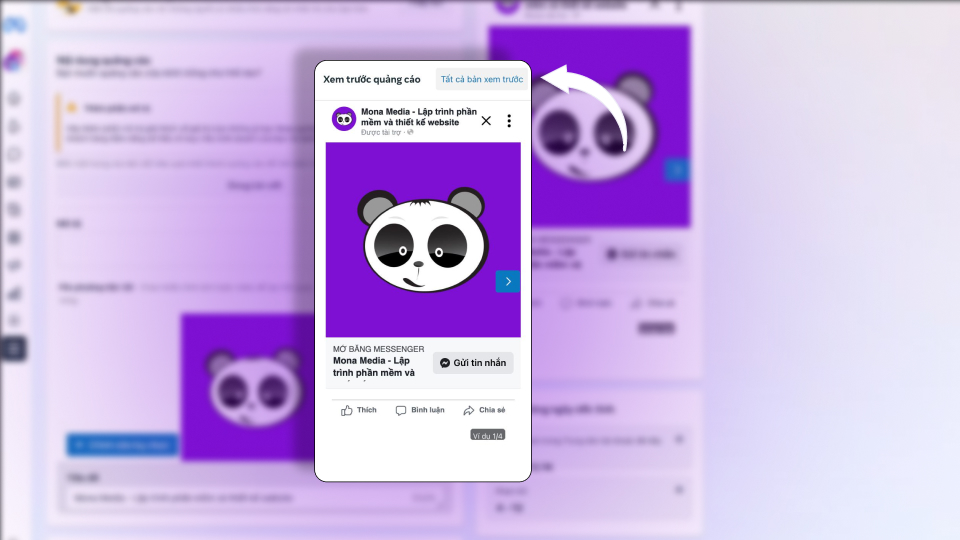
Step 9 – Wait for approval, then check and track results
After you click to run FB Ads, you will wait for Facebook's approval. Then check and track how the ads perform on Facebook. Note that ad review usually takes from a few hours to a few days (depending on the case).
Read more: Facebook ad review taking long? Tips for faster approval
Facebook Ads can be stopped at any time. You can turn campaigns, ad sets or ads on or off whenever you like to control delivery. You can also check the delivery of a campaign, ad set or ad by looking at that toggle.
So how do you turn ads on or off?
Before you start, keep in mind:
To turn ads on or off, follow these steps:
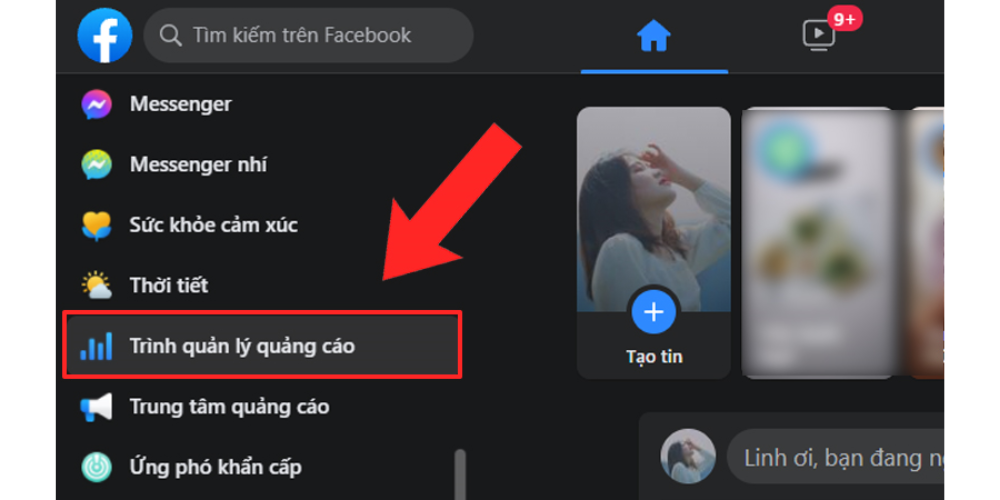
*Note: When an ad is on, the toggle is blue; when it is off, the toggle is gray.
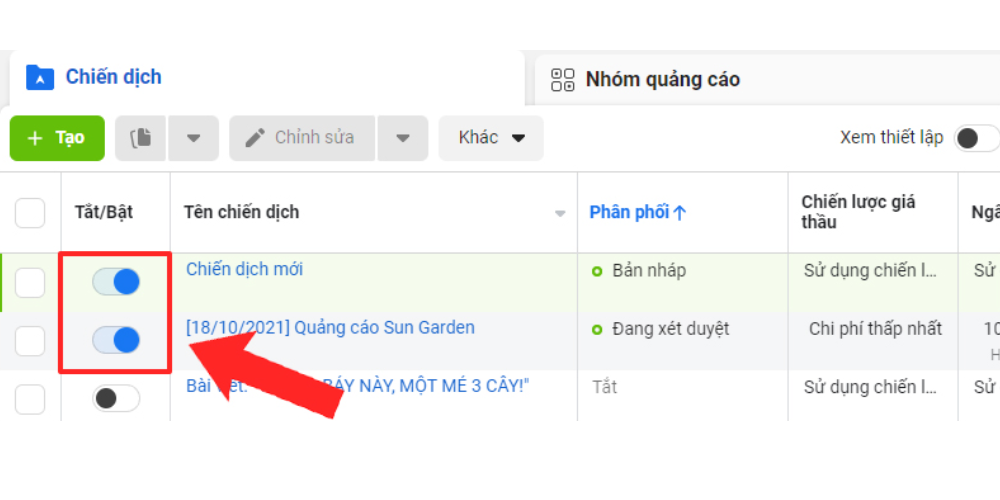
When you no longer want to see a particular campaign, ad set or ad on Facebook, you can delete it. After deleting, you will no longer see the campaign, ad set or ad in your account, and you cannot undo it. If you may want to run it again later, turn it off instead of deleting it.
If you want to review performance data for a deleted campaign, ad set or ad, use Facebook's filters. Click Filter in Ads Manager, then select Deleted under Delivery in the dropdown menu.
To delete a specific campaign, ad set or ad, follow these steps:
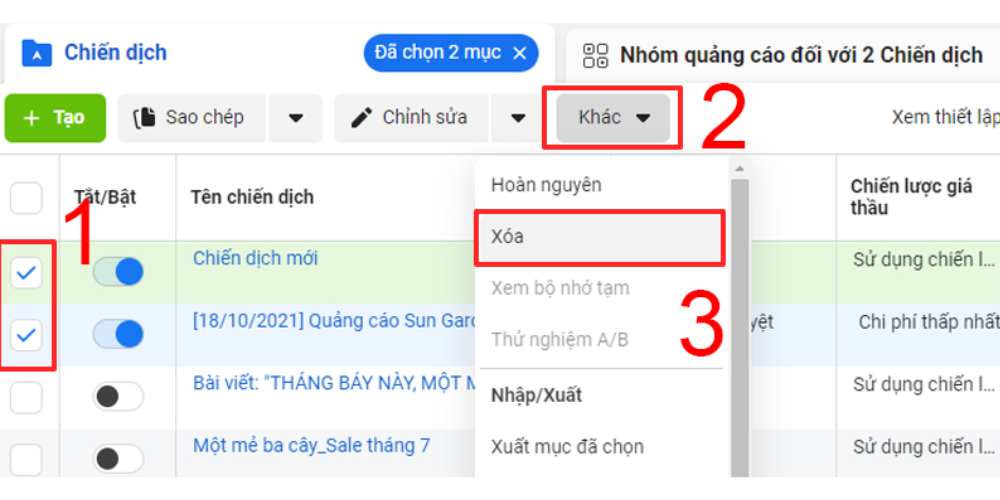
*Note:
Besides the Facebook Ads instructions above, MONA has a few more tips to help your ad campaign perform at its best.
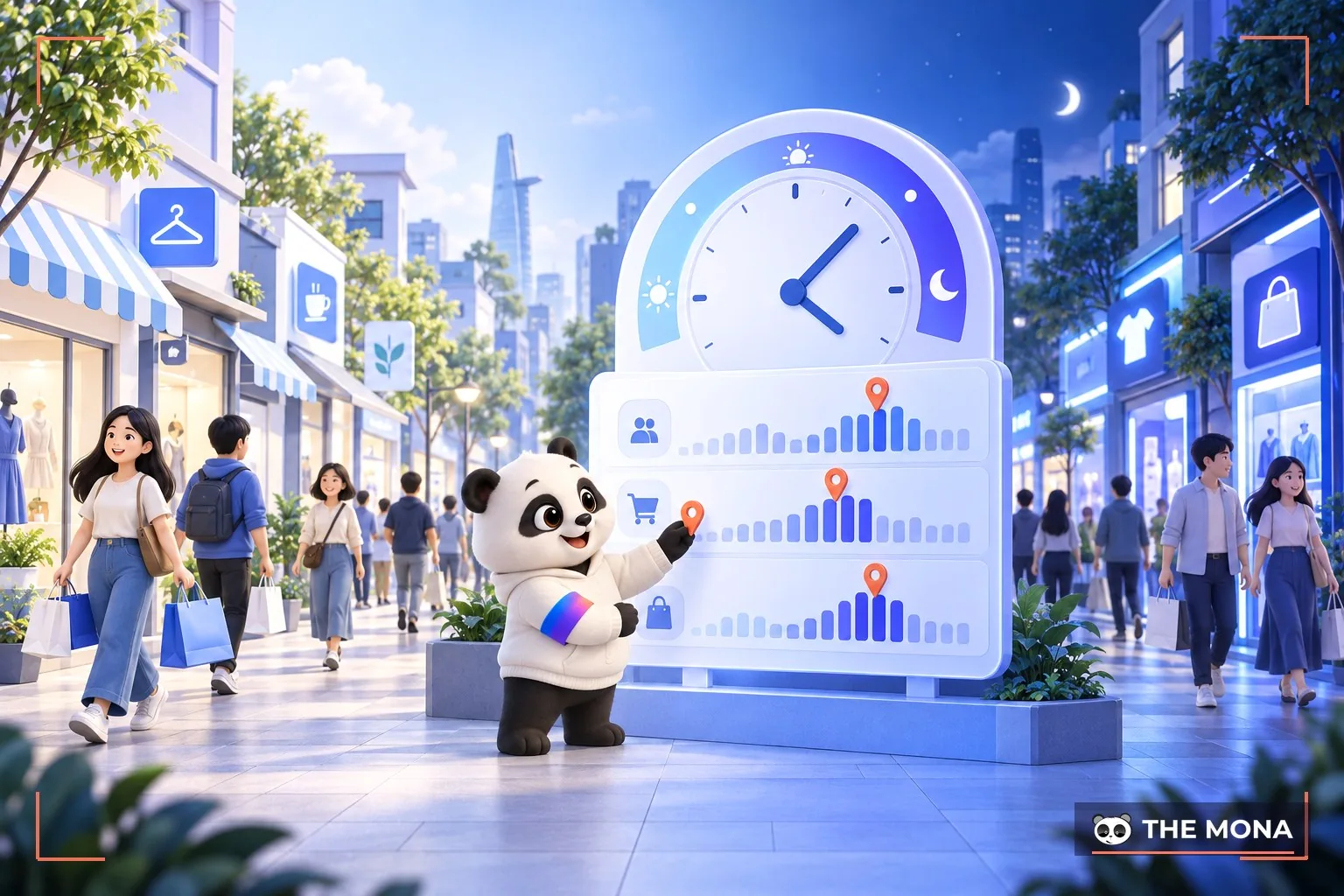
The best time to post helps you reach the largest share of your target audience. The same goes for Facebook ads: choosing the best time to run them gets you the best results.
The best times vary by business type, product and audience. You can also read our article on the best times to post on Facebook to work out when to publish your ads.
In MONA's experience, the minimum budget for Facebook Ads is 100,000 VND/day. Split it into 3-5 campaigns of 100,000 VND each instead of putting the whole budget on a single post. Splitting the ad budget and topping up when it runs out is an approach MONA has used very effectively.
Of all the posts on your Fanpage, running FB Ads on posts with high engagement saves cost and brings more engagement and conversions. So to optimize your Facebook ad campaign, create content first and test which posts get the most engagement, then run ads on those.
CTA (call to action) is the last key factor that decides whether customers actually buy, sign up, like and so on. Your call to action must be interesting and appealing enough to lead customers to the next step.
Running Facebook Ads the wrong way can send your advertising goal off course, and you will surely not get high performance. Facebook describes its ad campaigns in detail to help businesses find the best way to get results for each campaign. There are 3 main ad groups to refer to:
Group 1 – Awareness stage
At this stage, focus on 2 factors:
Group 2 – Consideration stage
At stage 2, pay attention to factors such as:
Group 3 – Conversion stage
At stage 3, pay attention to:
Content is always an important factor in the performance of any marketing campaign. If you do not invest in content and do not give customers useful information, you will certainly not get high performance when running FB Ads.
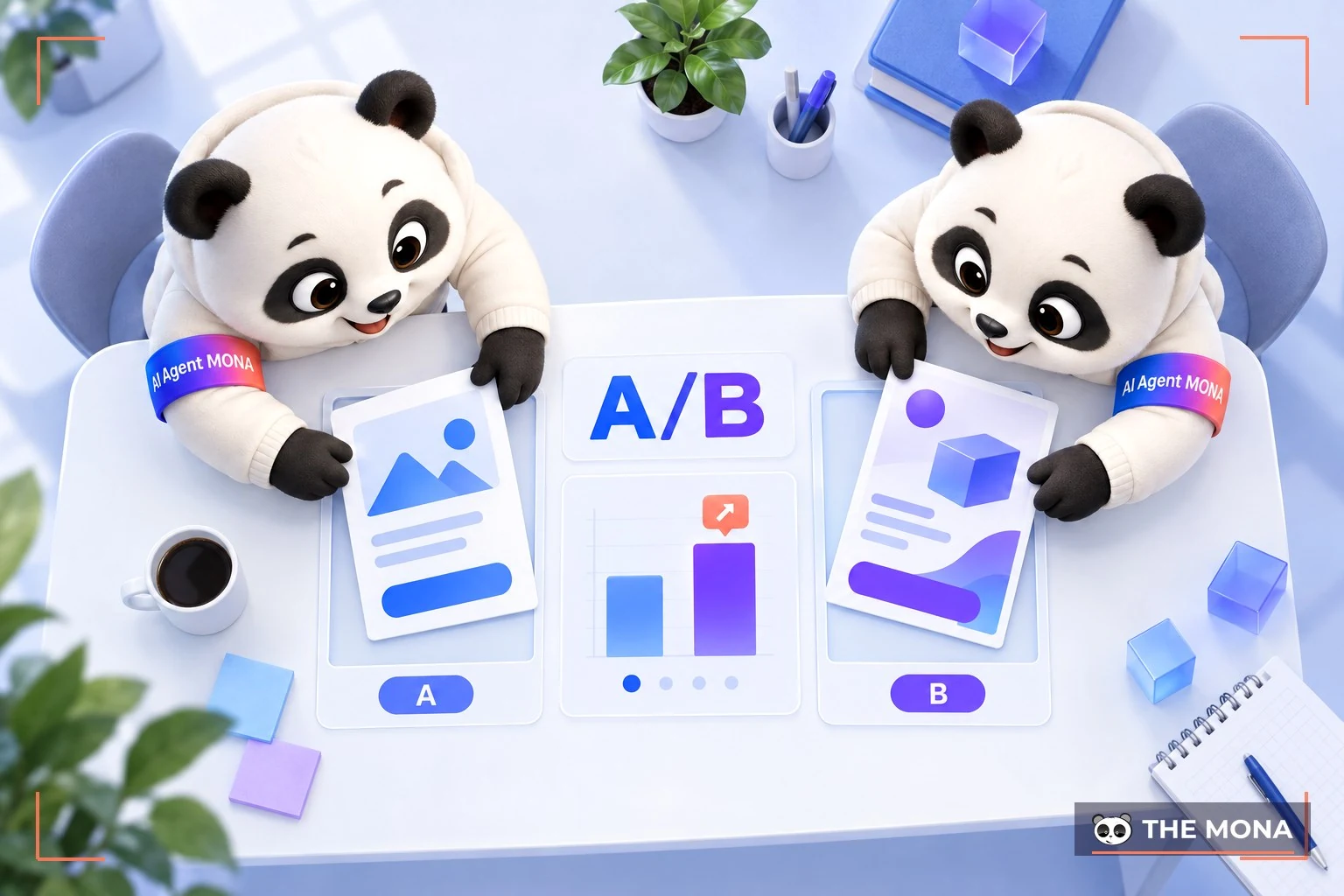
When you run FB ads, it's hard to tell which ad creative will perform best and at which times. So you have to create several ad variations and test them. That gives you concrete results to evaluate.
Testing is fairly simple: set up 2 identical ads and change just 1 element to compare. That element can be the content, CTA, image, location, target audience, or even the strategic goal.
Targeting the wrong audience is damaging. No matter how well your ads run, a campaign that brings no customer conversions is a failed campaign, because it earns you no revenue. So make sure you have studied your customer insights carefully before choosing the target audience for your ad campaign.
Facebook has a best-fit display frame for each type of image. So when you post content to run Facebook Ads, optimize your images to the required dimensions. This step is essential when running Facebook Ads, and it helps the campaign cost less and reach more customers.
Will running Facebook ads definitely bring in customers?
MONA Media can't guarantee that running ads on Facebook will bring you customers. However, Facebook ads have great potential for reaching and attracting your target customers. Remember that FB ads are only one marketing method. You also need to consider other factors, such as product or service quality, how you interact with customers and brand building, to keep a steady flow of customers over the long term.
What should you do if you violate Facebook's advertising policies?
If you violate Facebook's advertising policies, you may run into problems such as ads being rejected, ads being limited, or ads being removed. When that happens, contact Facebook as quickly as possible for support. Keep in mind that resolving a policy violation with Facebook can take a long time, so be patient. It's best to always follow the policies and keep up with Facebook's latest rules so your ads perform as well as possible.
Should you advertise on other platforms instead of focusing only on Facebook?
Yes. Advertising on several platforms brings you many benefits: a more diverse source of potential customers, no dependence on a single platform if something goes wrong, wider brand coverage across the internet, and better results from your ads and marketing campaigns.
In this article, MONA has walked you through how to run Facebook ads in detail. We hope this helps you run FB ads for your own products or services. If you're also looking for a reputable provider to run Facebook Ads advertising, MONA Media is definitely the right choice for you. Our principle is “any budget works”: we launch campaigns quickly with specific, committed results, and we're confident we can meet every client's needs, even in the hardest industries. Contact the MONA team via HOTLINE 1900 636 648 for a consultation and a detailed quote.
Learn more about running Facebook ads

CEO & Founder · The MONA
Founder of The MONA, who built a services company of 200+ staff with 14,000+ projects delivered. Khánh Hùng shares how he thinks about building systems that run themselves, automating a business, and the real lessons from delivering projects at MONA.
 1,5K
1,5K




Professional website
design services
Own a website with a beautiful, 100% exclusive design and a lifetime warranty, with the ability
to expand features flexibly as your business grows, starting today!








 MONA will never sell your information or send you spam
MONA will never sell your information or send you spam
MONA will never sell your information or send you spam


 MONA will never sell your information or send you spam