
 MONA OS 2.0
 Partner with MONA


 Tự động hoá doanh nghiệp
 Cẩm nang SEO
 Digital Marketing
 Kinh nghiệm thiết kế website
 Hạ Tầng Server
 Giáo dục


 VI
 EN












Message us on
Zalo Official


 ProductsNew

 ProductsProducts
 Mới ra mắtKHA AI 2027App tự edit video, tự đăng mọi mạng xã hội, 2 phút mỗi ngày










 Website designLooks good and wins customers over.
SEO servicesBrings in customers searching for exactly what you sell.
 Tư vấn digital marketingKéo khách từ nhiều kênh, đo bằng số thật.
Corporate video productionVideos introducing your company, factory and team.
 NewAI video productionCompany story films made with AI.
 Custom software developmentCRM, ERP and HRM built for your business.
 Viết AI Agent theo yêu cầuĐặt riêng một trợ lý AI cho đúng việc của mình.
 Tư vấn chuyển đổi AIĐưa AI vào vận hành của cả công ty.
NewMONA LMSManagement for centers and schools.
MONA SkillHubInternal training for company staff.
 NHTQ systemEnd-to-end China–Vietnam shipping operations.
MONA JMSManagement for gold, diamond and pawn shops.
 MONA E-LearningA website with every feature you need to sell courses.
 How to sell online courses (course)More than 30 free lessons on selling courses on autopilot.
 MONA Cloudmonacloud.vnServers to get your apps and websites running.
 MONA Basemonabase.vnPostgres database, sign-in and file storage.
 MONA Mailmonamail.vnSend OTP, order and invoice emails from your software.
 MONA Paymonapay.vnAccept bank transfers via VietQR and notify your software when the money arrives.
 MONA eInvoiceComing soonIssue e-invoices that meet tax standards.
Gấu CườiTrả lời khách 24/7 trên web, Fanpage, Zalo và thu lead cho sale.
 Gấu TeleSalesGọi điện tư vấn, chăm khách như tổng đài viên thật.
Dê CườiTư vấn và chốt đơn cho shop ngay trong khung chat.
Gấu WebmasterNhắn nhóm Zalo là website được sửa xong.
 Gấu Pháp ChếSoạn hợp đồng, rà điều khoản trong vài phút.
 Gấu Báo GiáLên báo giá đúng mẫu và gửi khách ngay.
 AI chăm sóc khách hàngTheo dõi và giữ chân khách hàng cũ.
 Gấu Tuyển DụngLọc hồ sơ, hẹn lịch, phỏng vấn ứng viên.
 Mới ra mắt
KHA AI 2027
Xây kênh chuyên gia 2 phút mỗi ngày
Quay bằng điện thoại, AI tự edit video, tự đăng lên 16 nền tảng và tự trả lời bình luận, tin nhắn.
853.713lượt xem trên kênh CEO MONA sau 29 ngày
 Anh Khánh HùngCEO MONA đang dùng mỗi ngày
Xem app làm được gì
 AI
Gấu Cười MONA ĐANG TỰ XÀITrả lời khách 24/7 trên website, Zalo OA, Messenger và thu lead về cho sale.
Dê CườiChốt đơn bán lẻ và sàn: Shopee, TikTok Shop, web. Chăm cả khách sỉ, đại lý.
Gấu WebmasterCập nhật nội dung, tối ưu SEO website mỗi ngày.
Gấu TeleSalesGọi điện tư vấn, chăm khách như tổng đài viên thật.
Gấu Tuyển DụngLọc hồ sơ, hẹn lịch, phỏng vấn ứng viên tự động.
AI chăm sóc khách hàngGiữ khách cũ, cứu lead đã rớt cho phòng kinh doanh.
Gấu Pháp ChếSoạn hợp đồng, rà điều khoản trong vài phút.
Gấu Báo GiáLên báo giá đúng mẫu, gửi khách ngay khi có yêu cầu.
 Chuyển đổi AI toàn phầnGiải pháp tổng cho doanh nghiệp, 3 lớp triển khai.
 Viết AI Agent theo yêu cầuĐặt riêng một con AI gánh đúng nghiệp vụ của bạn.
 Custom softwareCRM, ERP and HRM with built-in AI automation.
 SEO & AEO thời đại AIĐược Google lẫn AI trích dẫn, không chỉ xếp hạng.
 Kiến thức AI cho doanh nghiệpBài phân tích, hướng dẫn ứng dụng AI vào vận hành.
 Free AI courses
 AI tools at work
App mới · KHA AI 2027
Xây kênh 2 phút mỗi ngày
AI tự edit video, tự đăng mọi mạng xã hội
Free consultation, 8am–10pm every day

18 March, 2023
Lately, Facebook has been tightening its review process, leading to a wave of a disabled Facebook ad account. This can happen for many reasons and ends with the account being locked and disabled. So when your Facebook ad account is disabled what do you do? Let MONA Media share how to sort this out in the article below.

According to statistics, every week in Vietnam over 10,000 ad accounts are disabled, and the number keeps rising. So what does a disabled account mean, that 90% everyone who has run Facebook ads runs into it?
Put simply, A disabled ad account means your account can no longer be used to run ad campaigns on the platform. All ad features and tools are frozen, and every ad running on that account is paused.
People often confuse a disabled Facebook ad account with a restricted account. A disabled account cannot run ads at all, while a restricted account still can but with limits on spending or features.
To check your account status, go to “Account Quality“. If your account is disabled or restricted, you will get a notification by email and on Facebook.
Facebook has strict ad policies and will disable an account if it detects any improper activity. A disabled Facebook ad account is usually caused by these main reasons below:

Facebook sets detailed standards for ad content. If your ad breaks any of these policies, your account is put on the blacklist and your ad campaign is disabled.
In detail, some Facebook’s advertising policies common violations that get a Facebook account disabled are:
≫Read more: Words banned in Facebook ads that you should watch out for
From the point of view of Facebook's AI algorithms, an ad account doing things like: Logging in from many different IPs, suddenly raising or cutting the budget, running ads for the first time,.. is considered abnormal and needs close attention. This can lead to negative reviews and a disabled Facebook ad account.

Quite a few ad accounts get disabled because of overspending when the budget was not watched, or late payments, unpaid Facebook ad bills from earlier campaigns,… The fix is to check your budget regularly and pay on time and in full so your ads are not restricted.
Sometimes Facebook ad accounts are disabled by mistake on Facebook's side, especially personal accounts running ads for the first time. So if you are running ads for the first time and have not broken any Facebook ad policy, appeal to Facebook to get it resolved!
≫Related reading: Causes and fixes when Facebook ads are flagged
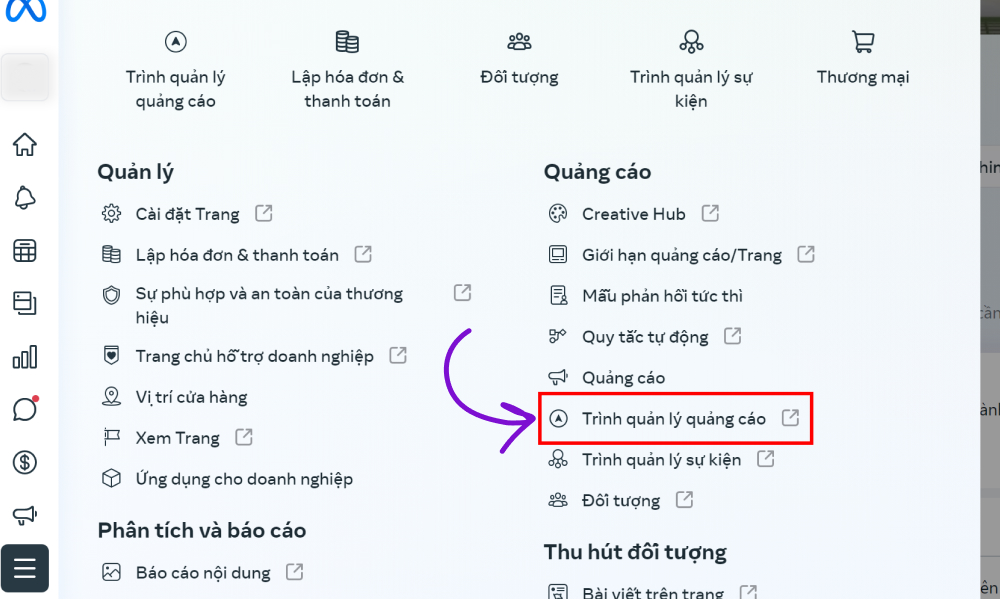
When your Facebook ad account is disabled, submitting a review request is the key step to fix it. This guide to appealing a Facebook ad account will help you get your ad account running normally again.
For the first step, download an IP-changing app, switch to a foreign IP, ideally a US one for stability.
For a personal account, you can go to Business Support Home to request a review of your ad restrictions. Once the feature is active, you can submit a request for your ad account by following these steps.
Method 1:
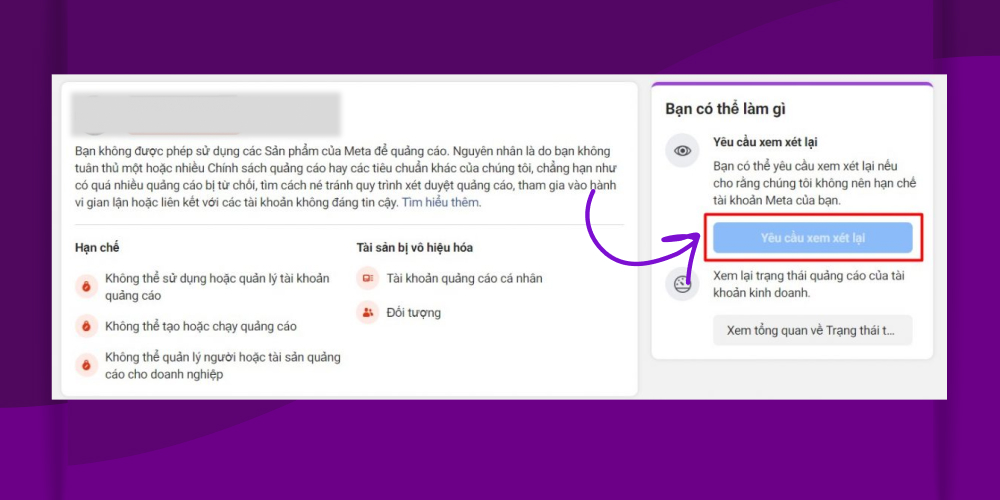
Method 2: Open Business Support Home and choose View My Account
For a business account, the process is simpler: go straight to HERE to take a look. It usually takes about 24 to 48 hours for Facebook to review and approve your request to lift the ad restriction. For more complicated cases, Facebook may take longer.

Facebook has a team that handles ad account issues. To contact the Facebook team directly, go to this link: https://business.facebook.com/business/help
On the page, you will see a section like the image shown in the middle of the page. Click the “Start” button and then choose “Privacy policy and account” -> “Chat with a representative“.
When you contact them, describe your situation accurately, do not copy answers from the internet, and follow the instructions the Facebook support agent gives you. This helps resolve your problem faster and more effectively.

To help you avoid Facebook ad account is disabled, MONA has put together these useful tips:
Having a backup Ads account is important. If one account dies, you still have another to keep running. To create an ad account, follow these steps:
Normally, one Facebook account can only create 1 personal ad account and 2 Business Manager accounts. So you can borrow accounts from relatives and friends.
This is the option most people use today. If you cannot borrow an account, buy a Facebook account. “Via” means Facebook accounts that were hacked and then sold to people who need to run ads, seeding,… However, when buying an account, choose reputable sellers and buy a via with high engagement, or it will not be able to create an ad account.
Hiring a professional agency to run your ads can be the best solution for you. Agencies usually have experience and a deep understanding of Facebook's policies and rules, so they can keep your ad campaigns effective. It also saves you time and effort in dealing with ad problems, so you can focus on growing your business.
|
MONA Media is one of the most trusted names in running Facebook advertising services. With experience working with over 10,000+ customers across many industries, MONA is committed to helping “customers get orders” as soon as the ads start running. MONA also offers a range of high-converting ad formats such as Messenger ad campaigns, Carousel Ads, Ads Break (in-stream ads), Click to web ads, Page like ads,… 
So what makes MONA different?
What are you waiting for? CONTACT US to have the team MONA Media give you a quote and detailed advice on marketing solutions in general and advertising services in particular! |
Another option is to rent someone else's ad account to run your ads. But this carries many risks, and it is easy to leak your “content win“. Others can take advantage of this and run your content themselves.
In practice, there is no ad account rental service that is transparent or backed by clear papers and contracts. So think carefully and only rent from people you trust.

Because of users who ran ads without paying and broke many policies, Facebook has blacklisted many Vietnamese bank card prefixes. As a result, adding a Visa card to a Facebook account may not work and can even get the card locked. In this case, you can try an international bank Visa in Vietnam such as Shinhan Bank, and use a card with the same name as the ad account.
Besides the steps above, you also need to make sure of the following: follow Facebook's ad policies, keep information consistent across accounts, and avoid logging into many accounts on one machine,… so your ad campaigns are approved quickly and your ad account stays safe.
That is our guide to what you should do if your Facebook ad account is disabled. We hope this information helps you when you need to appeal a Facebook ad account. Good luck!

CEO & Founder · The MONA
Founder of The MONA, who built a services company of 200+ staff with 14,000+ projects delivered. Khánh Hùng shares how he thinks about building systems that run themselves, automating a business, and the real lessons from delivering projects at MONA.
 1,6K



Professional website
design services
Own a website with a beautiful, 100% exclusive design and a lifetime warranty, with the ability
to expand features flexibly as your business grows, starting today!






 MONA will never sell your information or send you spam


 MONA will never sell your information or send you spam
